ServiceNow Discovery for Higher Education: Tuning Patterns for Research Computing, Cloud, and the Institutional Footprint

TLDRServiceNow Discovery for higher education requires meaningfully different tuning patterns than enterprise Discovery deployments. R1 institutions run federated identity rather than monolithic Active Directory, three or more cloud accounts with no central governance, research computing infrastructure that may live outside the institutional network, departmental servers owned outside central IT, classroom and residence hall technology purchased by colleges, and a long tail of SaaS the institution discovers only when something breaks. Out-of-box Discovery patterns miss most of this. This piece walks through the seven higher-ed-specific Discovery blind spots, the coverage matrix that defines what success looks like per CI class, the tuning patterns that work, and what an ITOM Pro Discovery deployment engagement actually produces.
ServiceNow Discovery does not know that your institution runs three different cloud accounts, that the largest application by storage footprint is a research data lake managed outside central IT, that classroom technology was purchased by colleges without IT involvement five years ago, or that the residence hall connectivity infrastructure is operationally critical but lives in a Facilities-owned data closet.
The pattern is consistent across higher ed. Discovery gets turned on during ITOM Pro deployment. Out-of-box patterns find the centrally-managed Windows and Linux servers, the network infrastructure with SNMP credentials, the storage arrays. Then the institution looks at the CMDB and the count is half of what it should be. The Discovery admin assumes the patterns need more tuning. They do, but the deeper problem is structural. Higher ed infrastructure is genuinely different from the enterprise infrastructure Discovery patterns were designed around.
ServiceNow Discovery for higher education is the deployment work that produces an accurate CI inventory across the institutional footprint. It is the Phase 2 work that our piece on ITOM and CMDB health names but does not deeply specify. This piece is the technical deep-dive.
The audience and what follows. This piece is written for the ServiceNow Platform Owner, the Discovery Admin, and the IT Operations Engineer who has to make Discovery actually work at a higher ed institution. The next sections cover the seven higher-ed-specific Discovery blind spots, the coverage matrix that defines per-CI-class success, the tuning patterns that resolve each blind spot, and what an ITOM Pro Discovery deployment engagement actually produces.
FOR THE CIO READING THIS
The strategic takeaway: your ITOM Pro Discovery deployment will not produce an accurate CMDB out of the box. It will produce an inventory of centrally-managed infrastructure and miss the research computing footprint, the multi-cloud reality, the departmental servers, and the long tail of SaaS your institution operates. Plan for higher-ed-specific tuning work as part of the deployment engagement, not as a follow-on phase. The tuning is the deployment, not an extra.
If your IT operations team is running an ITOM Pro deployment and you want to know what they should be working on, the seven blind spots framework and the coverage matrix that follow are the deliverables to ask about.
Why higher ed Discovery is structurally different from enterprise Discovery
Six structural realities establish the case.
Federated identity rather than monolithic Active Directory. Most enterprise Discovery deployments assume a central AD forest with a privileged service account that has read access to most infrastructure. Higher ed runs federated identity (often InCommon, often Shibboleth), with departmental authentication boundaries, with research computing on a separate identity layer. Discovery credentials cannot be centralized the same way.
Multi-cloud reality without central governance. Most R1 institutions run AWS for central IT, Azure for a particular research compute workload, GCP for another, and a long tail of departmental accounts. Cloud Discovery has to be deployed per account, and each account needs its own credential management.
Research computing infrastructure off the central network. HPC clusters often run on dedicated networks. Research data lakes may live in dedicated cloud accounts. Globus endpoints connect to other institutions. None of this is reachable by default Discovery configurations.
Departmental autonomy in IT purchasing. Colleges and departments buy infrastructure independently. Discovery needs to find what was purchased outside central IT.
Classroom and residence hall infrastructure owned outside IT. Audio-visual systems, lecture capture, digital signage, and residence hall connectivity are operationally critical but live in different ownership structures.
The long tail of unmanaged SaaS. Institutions discover their SaaS footprint only when something breaks. The CMDB has no record of the dozens of SaaS subscriptions individual units have purchased.
These six realities mean that out-of-box Discovery patterns produce a partial CMDB at higher ed institutions. The Discovery admin who understands these structural realities can plan the tuning work in advance. The Discovery admin who does not will produce a CMDB that looks complete but misses the operationally critical infrastructure.
The ServiceNow Discovery coverage matrix for higher education
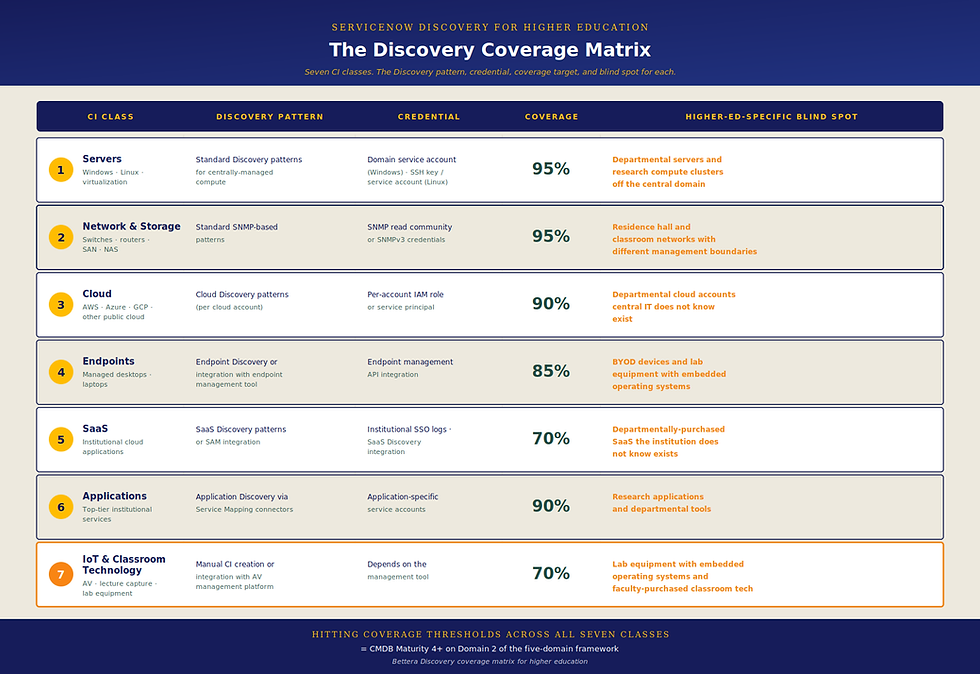
The Bettera framework. Seven CI classes mapped to the Discovery patterns that populate them, the credential type required, the coverage threshold that defines success, and the higher-ed-specific blind spot for each class. This is the leave-behind framework for the Discovery Admin during deployment.
Class 1: Servers (Windows, Linux, virtualization). Standard Discovery patterns work for centrally-managed servers. Credential: domain service account for Windows, SSH key or service account for Linux. Coverage threshold: 95% of centrally-managed compute. Blind spot: departmental servers and research compute clusters off the central domain.
Class 2: Network and storage. Standard SNMP-based patterns. Credential: SNMP read community or SNMPv3 credentials. Coverage threshold: 95% of network and storage infrastructure. Blind spot: residence hall and classroom networks that may have different management boundaries.
Class 3: Cloud (AWS, Azure, GCP). Cloud Discovery patterns. Credential: per-account IAM role or service principal. Coverage threshold: 90% of known cloud accounts. Blind spot: departmental cloud accounts the central IT team does not know exist.
Class 4: Endpoints. Endpoint discovery patterns or integration with the endpoint management tool. Credential: endpoint management API integration. Coverage threshold: 85% of managed endpoints (lower threshold because endpoints churn faster). Blind spot: BYOD devices and lab equipment with embedded operating systems.
Class 5: SaaS. SaaS discovery patterns or SAM (Software Asset Management) integration. Credential: institutional SSO logs, SaaS Discovery integration. Coverage threshold: 70% of known institutional SaaS subscriptions. Blind spot: departmentally-purchased SaaS the institution does not know exists.
Class 6: Applications. Application Discovery via Service Mapping connectors. Credential: application-specific service accounts. Coverage threshold: 90% of top-tier institutional services. Blind spot: research applications and departmental tools.
Class 7: IoT and classroom technology. Manual CI creation or integration with the AV management platform. Credential: depends on the management tool. Coverage threshold: 70% of operationally critical IoT (lower because this class is genuinely hard). Blind spot: lab equipment with embedded operating systems and faculty-purchased classroom tech.
The institution that hits the coverage thresholds across all seven CI classes has a CMDB at Maturity 4+ on Domain 2 of the five-domain framework from our piece on ITOM and CMDB health.
The seven higher-ed-specific Discovery blind spots
Deep treatment of each blind spot with the tuning pattern that resolves it.

Blind spot 1: Research computing infrastructure. HPC clusters, research data lakes, Globus endpoints, and dedicated research networks. Resolution pattern: deploy MID Servers inside the research network with research-IT credentials. Treat research computing as a distinct discovery domain with its own coverage targets.
Blind spot 2: Multi-cloud reality. Central IT AWS, research Azure, college-purchased GCP, departmental accounts the institution does not know about. Resolution pattern: deploy Cloud Discovery per known account, run periodic billing-record audits to identify unknown accounts, integrate with the institutional cloud governance program to enforce account registration.
Blind spot 3: Departmental servers off the central domain. Colleges, research groups, and administrative units may run servers outside the central AD forest. Resolution pattern: pattern adjustment for non-domain-joined servers, optional MID Server deployment in departmental network segments where Discovery is welcomed.
Blind spot 4: Classroom technology. AV systems, lecture capture, digital signage, projectors, classroom controllers. Resolution pattern: integration with the AV management platform (typically Crestron, Extron, or similar) rather than direct Discovery. Manual CI creation patterns for the classroom-level services.
Blind spot 5: Residence hall connectivity. Switches, wireless access points, IoT devices in residence halls. Often operationally critical, often owned by Housing or Facilities rather than IT. Resolution pattern: SNMP-based Discovery if credentials are available, manual CI creation patterns if not, explicit ownership documentation in the CMDB to surface the cross-functional dependency.
Blind spot 6: SaaS sprawl. Institutional accounts in dozens of SaaS apps purchased by individual units. Resolution pattern: institutional SSO log analysis, SaaS Discovery integration where available, partnership with procurement to identify SaaS at purchase time.
Blind spot 7: Lab equipment with embedded operating systems. Microscopes, sequencing equipment, spectrometers, instruments with Windows or Linux running underneath. Often connected to lab networks but unmanaged centrally. Resolution pattern: lab-network MID Server deployment, partnership with research IT for credential management, manual CI creation patterns where Discovery cannot reach.
Each blind spot has a defensible resolution. None of them is resolved by leaving the out-of-box Discovery patterns alone.
Tuning patterns by CI class
What Discovery configuration changes for higher ed deployments. Operational specificity.
Server discovery tuning. Schedule by infrastructure tier: production frequent, development less frequent, lab environments least frequent. Credential rotation: integrate with institutional credential vault for service accounts. Pattern adjustments: enable non-domain-joined server discovery, add custom patterns for research computing operating system distributions (CentOS, Rocky, SLES variants common in HPC).
Network discovery tuning. Enable SNMPv3 where possible for security. Add custom patterns for research network equipment that may use different vendor stacks than central IT. Discover network topology including the cross-domain boundaries (central IT to research IT, central IT to residence hall network).
Cloud discovery deployment. Deploy Cloud Discovery per known account with the appropriate IAM role. Establish a recurring cloud account reconciliation process between Discovery results and institutional billing records. Tag CIs with the responsible administrative unit (central IT, research, college name) for accurate ownership.
Endpoint discovery integration. Decide between native Endpoint Discovery and integration with the endpoint management platform (typically Microsoft Endpoint Manager, JAMF, or similar). For higher ed, integration usually produces better coverage because endpoint management tools already have managed device records.
SaaS discovery integration. Use institutional SSO logs as the primary source of SaaS discovery. Integrate with the SAM tool if deployed. Partner with procurement to flag new SaaS purchases at the contract stage.
Application discovery. Application Discovery via Service Mapping connectors for top-tier institutional services. Manual CI creation patterns for research applications and departmental tools. This is the natural bridge to Service Mapping work, covered in our forthcoming piece on Service Mapping for higher education.
Classroom and IoT discovery. Almost always integration-based rather than native Discovery. Identify the management platform for each class and build integration patterns.
Discovery and Service Mapping working together
The two capabilities operate as a system.
Discovery populates the CI inventory. Service Mapping uses the CIs to build the application-to-business-service dependency map. Discovery without Service Mapping produces a CMDB that knows what infrastructure exists but does not know what services depend on what. Service Mapping without Discovery produces a service catalog that points to CIs that may not be current.
The two capabilities together are what make CMDB Maturity 4+ possible across Domains 2 (Discovery coverage) and 4 (Application and business service mapping) from the five-domain framework in our piece on ITOM and CMDB health.
The deployment sequence matters. Discovery comes first because Service Mapping needs current CIs to map dependencies against. The Discovery deployment establishes the CI inventory. The subsequent Service Mapping work uses that inventory to build the dependency map.
Our forthcoming piece on Service Mapping for higher education walks through the pattern catalog: what the top-tier higher ed services are (LMS, SIS, HR/payroll, advancement CRM, library, research computing, learning spaces tech, identity and access), what their typical dependency structures look like, and the Service Mapping patterns that produce production-grade mapping for each.
What an ITOM Pro Discovery deployment engagement actually produces
The work organized by stage and deliverable. Each stage produces specific outputs that an IT operations leader can validate and an institution can hand off internally.
Stage 1: Credential resolution and MID Server architecture. Inventory the credentials Discovery will need across the institutional footprint. Identify the institutional credential vault and the integration pattern. Design the MID Server topology: central MID Server cluster for core IT infrastructure, optional secondary MID Servers in research network segments, in lab environments, in DMZ zones for cloud-adjacent discovery.
Produces: documented MID Server topology, credential plan integrated with the institutional credential vault, validated connectivity across institutional network boundaries.
Stage 2: Initial Discovery jobs and CI population review. Run Discovery against the core IT infrastructure first. Review the initial CI population. Identify gaps and anomalies.
Produces: baseline CI inventory across centrally-managed infrastructure, first tuning round of Discovery patterns and credentials, gap analysis identifying the higher-ed-specific blind spots that apply to this institution.
Stage 3: Higher-ed-specific tuning across CI classes. Apply the tuning patterns for non-domain-joined servers, research computing infrastructure, departmental servers. Add custom Discovery patterns where needed. Expand Discovery scope to the secondary CI classes.
Produces: Discovery patterns adjusted for the seven higher-ed-specific blind spots, expanded CI coverage that includes research computing and departmental infrastructure, validated Discovery results against the institution-specific coverage thresholds.
Stage 4: Cloud Discovery deployment. Deploy Cloud Discovery for each known cloud account. Establish the account reconciliation process. Tag CIs with administrative ownership. Integrate Cloud Discovery results with the on-premises Discovery results in the unified CMDB.
Produces: multi-account cloud CI inventory with administrative tagging, account reconciliation process that surfaces unknown departmental cloud accounts, unified on-premises and cloud CMDB.
Stage 5: SaaS, endpoint, and classroom integration. Stand up the SaaS Discovery integration (SSO log analysis or SAM integration). Establish the endpoint management integration. Document the integration patterns for classroom and IoT technology. Begin manual CI creation patterns for the CI classes that cannot be discovered.
Produces: integration patterns for the CI classes Discovery cannot natively reach, documented manual CI creation patterns where integration is not possible, ongoing SaaS sprawl identification process.
Stage 6: Handoff to institutional ownership. Document all Discovery patterns, credentials, MID Server architecture, tuning decisions, and integration patterns. Train the institutional Discovery Admin on operating Discovery going forward. Establish the data quality KPI dashboard.
Produces: documented Discovery operating model, trained institutional Discovery Admin, KPI dashboard for ongoing Discovery health, foundation for subsequent Service Mapping work and any future ITOM Pro capability expansion.
The pacing of these stages depends on the institution's network topology, credential complexity, multi-cloud footprint, and team availability. The work that produces a Maturity 3-4 Discovery deployment is structured the same way at every R1 institution, but the calendar varies meaningfully. Scoping the specific engagement is the first conversation Bettera has with an institution, not a number quoted before the conversation. Any partner quoting a fixed timeline before understanding the institution's specific environment is selling capacity, not engagement.
For institutions evaluating an ITSM Pro upgrade at the same time, the Discovery deployment is the foundation that makes the ITSM Pro features deliver value.
What a Discovery Admin should ask in any Discovery deployment conversation
Five forwardable questions. Technical persona-appropriate.
1. "What is your MID Server topology recommendation, and how do you handle credential management across federated network boundaries?" Tests whether the partner has thought about higher ed network reality or assumes enterprise topology.
2. "Show me a Discovery pattern catalog from a similar-size R1 institution, including the patterns for research computing and multi-cloud." Tests whether the partner has actually done higher ed Discovery work or is going to learn on the engagement.
3. "What is your approach to credential rotation for the service accounts Discovery uses, and how do you integrate with the institutional credential vault?" Tests credential security thinking. Discovery service accounts often have privileged read access; the credential management discipline matters.
4. "How do you handle Discovery coverage for departmental servers and research computing infrastructure that may live outside central IT's network and identity boundary?" Tests whether the partner understands the federated reality.
5. "What does the deployment engagement structure look like, what stages does it cover, and what does the handoff to institutional ownership produce?" Tests whether the partner has a defensible deployment methodology and a real handoff plan, or is going to leave the institution operating Discovery without documentation.
Frequently asked questions
What is ServiceNow Discovery for higher education?
ServiceNow Discovery for higher education is the deployment and tuning of ServiceNow's Discovery capability (part of the ITOM Pro product family) to produce an accurate CI inventory across a higher education institution's specific infrastructure footprint. Higher ed deployments require meaningfully different tuning patterns than enterprise deployments because R1 institutions run federated identity, multi-cloud infrastructure without central governance, research computing off the central network, departmental servers outside central IT, classroom and residence hall technology purchased by colleges, and a long tail of SaaS the institution does not centrally track. Out-of-box Discovery patterns miss most of this.
What does ServiceNow Discovery typically miss at higher education institutions?
Seven higher-ed-specific Discovery blind spots apply consistently across R1 institutions. Research computing infrastructure (HPC clusters, research data lakes, Globus endpoints). Multi-cloud reality (central IT AWS, research Azure, college-purchased GCP, departmental accounts central IT does not know exist). Departmental servers off the central domain. Classroom technology purchased by colleges. Residence hall connectivity. SaaS sprawl across dozens of institutional accounts. Lab equipment with embedded operating systems. Each blind spot has a defensible resolution pattern, but none of them is resolved by leaving the out-of-box Discovery configuration alone.
How long does ServiceNow Discovery deployment take at an R1 institution?
The honest answer is that it depends on the institution's network topology, credential complexity, multi-cloud footprint, and team availability. The work that produces a Maturity 3-4 Discovery deployment is structured the same way at every R1 institution: credential resolution, MID Server deployment, initial CI population, higher-ed-specific tuning, cloud discovery deployment, integration patterns for the CI classes Discovery cannot natively reach, and handoff to institutional ownership. The pacing varies meaningfully across institutions. Scoping is the first conversation Bettera has with an institution. Any partner quoting a fixed timeline before understanding the institution's specific environment is selling capacity, not engagement.
Do we need MID Servers in research computing networks for Discovery to work?
Usually yes, if research computing infrastructure is on a separate network from central IT. MID Servers are how Discovery reaches infrastructure across network boundaries, and research networks often have explicit boundaries from central IT for security and operational reasons. The pattern is to deploy a secondary MID Server cluster inside the research network with research-IT credentials, and to treat research computing as a distinct discovery domain with its own coverage targets. The alternative (running Discovery from central IT credentials across the boundary) usually fails because the credentials do not have access, or because the network boundary blocks the discovery traffic.
How does ServiceNow Discovery integrate with our endpoint management tool?
The standard pattern is integration rather than native Endpoint Discovery. Endpoint management tools (Microsoft Endpoint Manager, JAMF, Workspace ONE, similar) already maintain accurate device records and produce better coverage for managed endpoints than native Discovery can. The integration brings the endpoint management records into the CMDB as CIs and keeps them current as devices are enrolled or retired. Native Endpoint Discovery is still useful for unmanaged or BYOD devices that fall outside the endpoint management scope, but for the managed device population, integration is the more reliable pattern.
What happens to Discovery when the institution adds a new cloud account?
Cloud accounts are Discovery-aware only after Cloud Discovery has been explicitly deployed for that account with the appropriate IAM role or service principal. A new cloud account that nobody told central IT about does not appear in the CMDB. The mitigation pattern is the account reconciliation process: a recurring audit that compares known cloud accounts in the CMDB against institutional billing records and cloud governance program records. The audit surfaces unknown accounts and triggers the registration and Cloud Discovery deployment for each. This is one of the reasons the institutional cloud governance program matters operationally, not just from a procurement perspective.
Where this leaves the IT operations team
ServiceNow Discovery for higher education is the technical work that produces the foundation everything else depends on. The seven blind spots and the coverage matrix are the tools the IT operations team uses to baseline current state and plan the tuning work. The ITOM Pro deployment is the engagement that delivers the foundation. The Service Mapping work that follows uses the Discovery foundation to build the dependency map that makes CMDB Maturity 4+ possible.
If your institution is in the early stages of an ITOM Pro deployment or evaluating the upgrade, that is the working session we facilitate at Bettera. Contact us and we will walk through the seven blind spots and the coverage matrix with your Discovery Admin and Platform Owner.
Bettera is the only ServiceNow consulting partner exclusively focused on higher education. ServiceNow Discovery deployment paired with CMDB remediation is one of the most operationally consequential engagements we lead R1 institutions through in 2026.